## About
Setup for weather, lighting and color grading. All mods in this guide are by **CyanideX**, except _The Nullifier_ (robber804), and are built to work together:
- **Nova City 2** replaces the weather and lighting (ENV) of the game.
- **Weather Switcher** controls the weather and is required by Nova City 2.
- **The Nullifier** removes area-specific lighting overrides, so the custom weather also shows up everywhere (e.g. in the Badlands).
- **Nova LUT 4** is the color grading (LUT). **LUT Switcher 3** lets you switch LUTs in game.
- **Nova Optics** fine-tunes exposure. Use it if Nova City 2 is too dark for you.
- **Torrent** replaces the flat vanilla rain with real drops lit by the city, and adds storms with lightning and thunder.
> Nova City 2 is designed for **Path Tracing**. It still works with RT or raster, but those modes are not its focus.
---
## Mods
| Mod name | Link | Purpose | Note |
| ---------------- | --------------------------------------------------------------- | ----------------------------------------------- | ------------------------------------------ |
| Nova City 2 | [NexusMods](https://www.nexusmods.com/cyberpunk2077/mods/12490) | Weather & lighting overhaul (ENV) | |
| Weather Switcher | [NexusMods](https://www.nexusmods.com/cyberpunk2077/mods/18027) | Change weather, control time, customize clouds | **Required** by Nova City 2 |
| The Nullifier | [NexusMods](https://www.nexusmods.com/cyberpunk2077/mods/23091) | Removes sector lighting overrides | **Required** by Nova City 2 |
| Nova LUT 4.0 | [NexusMods](https://www.nexusmods.com/cyberpunk2077/mods/11622) | Color grading (LUT) | |
| LUT Switcher 3 | [NexusMods](https://www.nexusmods.com/cyberpunk2077/mods/16310) | Switch LUTs in real time | + Optional file: **"LUT Pack - Nova LUT"** |
| Nova Optics | [NexusMods](https://www.nexusmods.com/cyberpunk2077/mods/29190) | Exposure, bloom, vignette etc. + vehicle fix | Optional, see [Nova Optics](#nova-optics) |
| Torrent | [NexusMods](https://www.nexusmods.com/cyberpunk2077/mods/37031) | Realistic rain, storm mist, lightning & thunder | Optional, see [Torrent](#torrent) |
**Requirements** (all listed under _Dependency Mods_ in [SitirioTV's Cyberpunk 2077 Mod Collection](./SitirioTVs-Cyberpunk-2077-Mod-Collection.md)):
[Cyber Engine Tweaks](./cyber-engine-tweaks.md), Codeware, redscript, RED4ext, ArchiveXL, TweakXL, Window Utils
For **Torrent** also: Mod Settings (to change its settings) and AudioXL (optional, without it the lightning has no thunder)
---
## Installation
1. Install the requirements first.
2. Drag & drop the content of each ZIP into the Cyberpunk 2077 root folder.
- Steam: `...\steamapps\common\Cyberpunk 2077\`
3. For **LUT Switcher 3**, also download the optional file **"LUT Pack - Nova LUT"** from its _Files_ tab. Without a pack, LUT Switcher shows no LUTs.
4. For **Torrent**, keep the regular **Nova City 2** main file. You do **not** need _"Nova City 2 - No Custom Rain"_: that version is meant for other rain mods, while Torrent builds on Nova City 2's rain weathers and replaces the rain itself.
> **Updating from Nova City 1?** Delete the `NovaCityTools` folder in `bin\x64\plugins\cyber_engine_tweaks\mods\` and the `NovaOverrides.ini` config file.
### Remove these mods
| Remove | Why |
| -------------------------------------------------------------------------- | ---------------------------------------------------------- |
| Other weather / lighting / ENV mods | Nova City 2 replaces them |
| Vignette-removal and exposure mods (e.g. _Crouch vignette effect remover_) | Not compatible with Nova City 2 |
| Ultra Fog | Overrides the same file. Use **Ultra Fog Lite** instead |
| Night City Visuals Nulled, Night City Fog Nulled, Dogtown Visuals Nulled | Replaced by The Nullifier |
| ENV Tuner Lite, Eye Adaptation Auto Exposure Fix | Not compatible with Nova Optics |
| Preem Optics, Blind Begone | Replaced by Nova Optics |
| Other LUT mods | Only one LUT can be active. Use LUT Switcher packs instead |
---
## Setup in Game
LUT Switcher, Weather Switcher and Nova Optics are configured in the **CET overlay** (see [Cyber Engine Tweaks](./cyber-engine-tweaks.md)). Each one has its own window. Torrent uses the **Mod Settings** menu instead.
### LUT Switcher
1. Open the **LUT Switcher** window.
2. Select **Nova LUT** in the sidebar, then **Nova LUT 4**.
3. Optional: Star it to add it to your _Favorites_.
The active LUT is saved automatically and persists across saves and reloads.
> Some quests and scripted scenes temporarily override the LUT. It comes back once the scene ends.
### Weather Switcher
No setup needed, the defaults work fine. Useful features:
- **Weather tab:** Lists all weather states, including the custom _Nova City_ states. Click one to apply it.
- **Reset/Resume Weather:** Returns to the normal weather cycle.
- **Auto Apply:** Applies the selected weather every time you load a save (e.g. 24/7 sun). Leave it **off** for the natural weather cycle.
- **Toggles tab:** Persistent toggles for visual features like blur, shadows and reflections.
> Together with the **Time Slider**, it's ideal for testing your settings at different times of day and in different weather.
### Nova Optics
Nova City 2 has a realistic exposure system, so nights and unlit interiors are **dark on purpose**. If it's too dark for you, use Nova Optics:
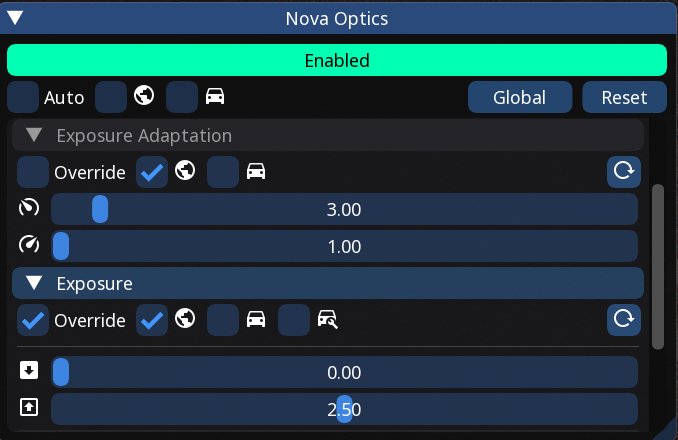
1. Open the **Nova Optics** window.
2. Click the red **Disabled** bar so it turns to **Enabled**.
3. Uncheck **Auto**. (Auto only fixes exposure while driving in first person and ignores your manual settings.)
4. Expand **Exposure**:
- Check **Override**.
- Check the **globe** icon (Global), so it applies everywhere. Leave the **vehicle** icons unchecked.
- Set **Shadow Boost** (upper slider) to **2.50**.
- Leave the lower slider at **0.00**.
Changes are applied live and saved when you release the slider.
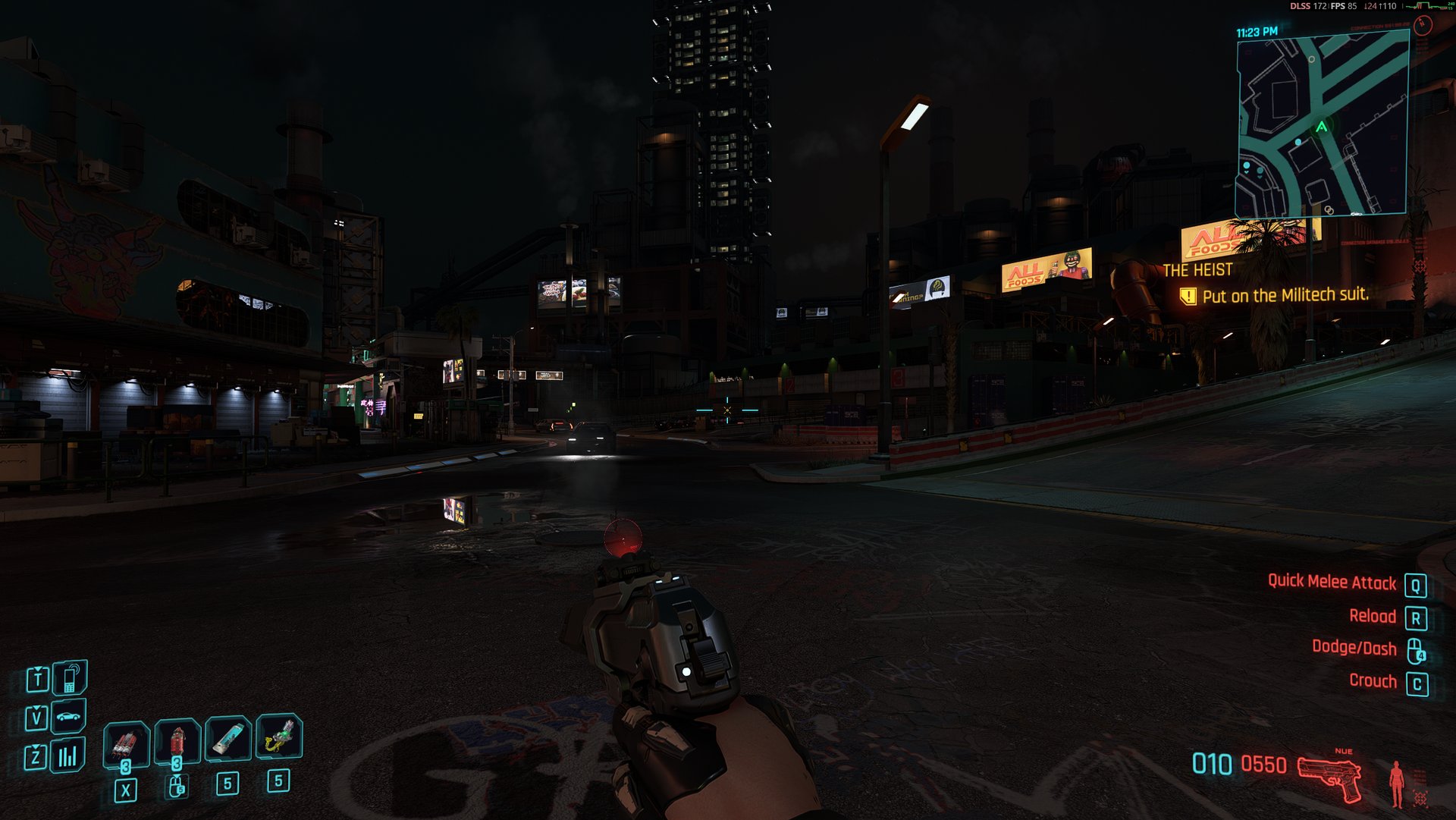
 **Shadow Boost 0.00:**
 **Shadow Boost 2.50:**
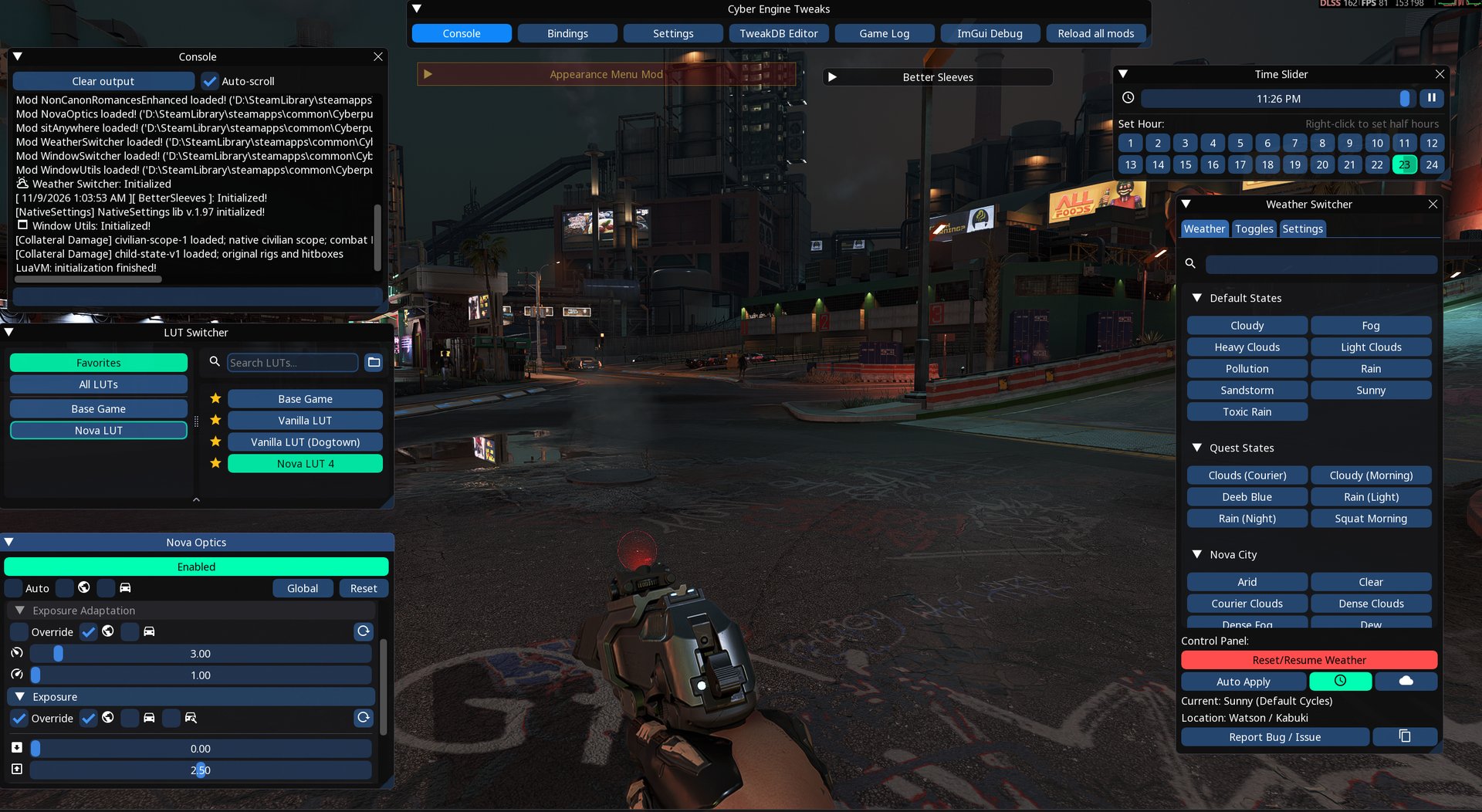 > Higher values brighten dark scenes further, but the image can start to look washed out. Check the result at night **and** at noon.
### Torrent
> **Warning:** Storms bring lightning flashes. If flashing lights bother you, turn on **Reduce Flashes** or set **Lightning** to **Off**.
No setup needed, the defaults work fine. All settings are under **Mod Settings > Torrent**:
| Setting | What it does |
| -------------------- | ---------------------------------------------------------------------------------------------------------------- |
| Enabled / Quality | Turns the mod on or off. Quality: Low, Medium, High or Ultra |
| Intensity | More and thicker rain on top of each weather's look |
| Visibility | Use it if the rain looks too faint on your setup |
| Rain Cover | How rain gets under roofs and bridges: **Simple** (straight down), **Auto** (default, only when windy), **Full** |
| Storm Mist | Wind-blown mist and spray in Nova City 2's _Storm_ weather |
| Lightning | **Off**, **Storms Only** or **All Rain** |
| Lightning Frequency | 1 to 10 (default 3). Each step means about 50 % more strikes |
| Reduce Flashes | Dimmer bolts, one slow glow instead of a flicker, fewer strikes |
| Thunder Volume | Needs AudioXL |
| Lightning Strike Key | Key to trigger a strike on demand while it's raining |
> Use **Weather Switcher** to set a rain or storm state for testing. Lightning comes mostly between 9 pm and 2 am game time.
The performance cost is small: about 1-2 FPS with the default settings. Torrent saves nothing to your save game, so you can install or remove it at any time.
**Uninstall:** Delete the folders `red4ext\plugins\Torrent` and `red4ext\plugins\AudioXL\sounds\Torrent`.
---
## Troubleshooting
| Problem | Solution |
| ----------------------------------------- | -------------------------------------------------------------------------------------------------------------------- |
| Still too dark | Raise **Shadow Boost** in Nova Optics. Reset the in-game gamma to default. A flashlight mod helps in unlit areas |
| Nova Optics doesn't change anything | Check that it says **Enabled**, **Auto** is unchecked and **Override** + **Global** are checked |
| Badlands / some areas ignore the weather | **The Nullifier** is missing |
| Weather never changes | Turn off **Auto Apply** in Weather Switcher, or click **Reset/Resume Weather** |
| LUT Switcher shows no LUTs | Install the optional **"LUT Pack - Nova LUT"** |
| LUT Switcher / Nova Optics window missing | CET or one of the requirements is missing or outdated |
| Lightning has no thunder | **AudioXL** is missing, or **Thunder Volume** in Torrent's settings is too low |
| Rain looks flat again after a game update | Torrent stops drawing when a patch changes the game's rain, until Torrent is updated |
| Lower FPS in rain | In Torrent's settings: lower **Quality** to High or Medium, set **Rain Cover** to Simple, or turn off **Storm Mist** |
---
## References
- [SitirioTV's Cyberpunk 2077 Mod Collection](./SitirioTVs-Cyberpunk-2077-Mod-Collection.md)
- [Cyber Engine Tweaks](./cyber-engine-tweaks.md)